JWT Attacks
We can use JWT Editor (Burp Plugin), JWT Analyzer (Caido Plugin) or web JWT Editor.
A JSON Web Token (JWT) is a secure way to send information between a client and a server. It is mainly used in web applications and APIs to verify users and prevent unauthorized access. A JWT is JSON data secured with a cryptographic signature.
The signing can be done using these cryptographic methods:
- HMAC (Hash-based Message Authentication Code)
- RSA or ECDSA (Asymmetric cryptographic algorithms)
JWT Structure
Here is the structure of a JWT:
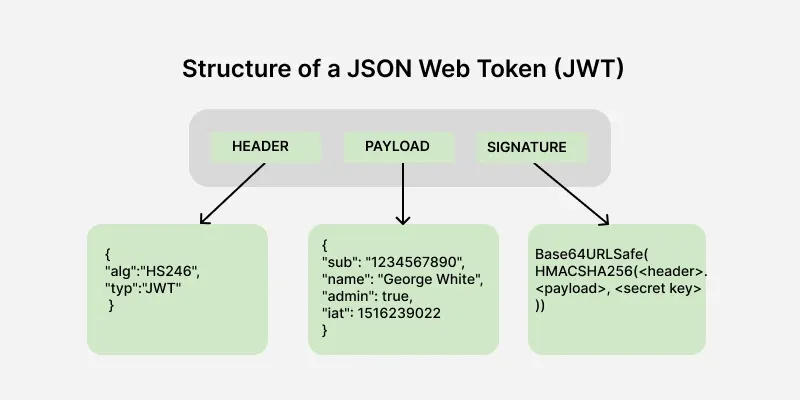
A JWT consists of three parts, separated by dots (.)
Header. Payload. Signature
- Header: Contains metadata about the token, such as the algorithm used for signing.
- Payload: Stores the claims, i.e., data being transmitted.
- Signature: Ensures the token's integrity and authenticity.
Header
The header contains metadata about the token, including the signing algorithm and token type here metadata means data about data.
{
    "alg": "HS256",
    "typ": "JWT"
}
- alg: Algorithm used for signing (e.g., HS256, RS256).
- typ: Token type, always "JWT".
Base64Url Encoded Header:
eyJhbGciOiJIUzI1NiIsInR5cCI6IkpXVCJ9
Payload
The payload contains the information about the user also called as a claim and some additional information including the timestamp at which it was issued and the expiry time of the token.
{
    "userId": 123,
    "role": "admin",
    "exp": 1672531199
}
Common claim types:
- iss (Issuer): Identifies who issued the token.
- sub (Subject): Represents the user or entity the token is about.
- aud (Audience): Specifies the intended recipient.
- exp (Expiration): Defines when the token expires.
- iat (Issued At): Timestamp when the token was created.
- nbf (Not Before): Specifies when the token becomes valid.
Base64Url Encoded Payload:
eyJzdWIiOiIxMjM0NTY3ODkwIiwibmFtZSI6IkpvaG4gRG9lIiwiaWF0IjoxNzA4MzQ1MTIzLCJleHAiOjE3MDgzNTUxMjN9
Signature
The signature ensures token integrity and is generated using the header, payload, and a secret key. In this example we will use HS256 algorithm to implement the Signature part:
HMACSHA256(
    base64UrlEncode(header) + "." + base64UrlEncode(payload),
    secret
)
Example Signature:
SflKxwRJSMeKKF2QT4fwpMeJf36POk6yJV_adQssw5c
Final JWT token
After all these steps the final JWT token is generated by joining the Header, Payload and Signature via a dot. It looks like as it is shown below.
eyJhbGciOiJIUzI1NiIsInR5cCI6IkpXVCJ9.eyJzdWIiOiIxMjM0NTY3ODkwIiwibmFtZSI6IkpvaG4gRG9lIiwiaWF0IjoxNzA4MzQ1MTIzLCJleHAiOjE3MDgzNTUxMjN9.SflKxwRJSMeKKF2QT4fwpMeJf36POk6yJV_adQssw5c
Exploitation
None Algorithm
This occurs due to implementation flaws, when the server doesn't verify the signature of any JWTs that it receives.
- Capture the request on burpsuite with JWT Token.
- Use JWT Editor to modify the token.
- Use "Attack" built in feature:
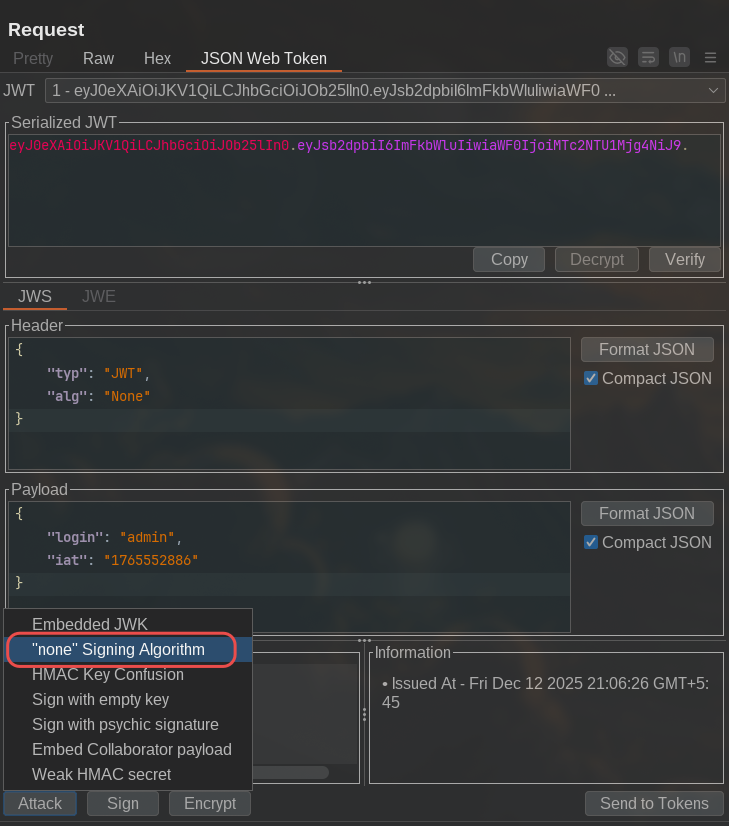
Make sure to try "alg": "none" and other CASE when attacking black box. PHP application requires None and not none.
Algorithm Confusion Attack
https://portswigger.net/web-security/jwt/algorithm-confusion
Algorithm confusion attacks (also known as key confusion attacks) occur when an attacker is able to force the server to verify the signature of a JSON web token (JWT) using a different algorithm than is intended by the website's developers. If this case isn't handled properly, this may enable attackers to forge valid JWTs containing arbitrary values without needing to know the server's secret signing key.
Algorithm confusion vulnerabilities typically arise due to flawed implementation of JWT libraries. Although the actual verification process differs depending on the algorithm used, many libraries provide a single, algorithm-agnostic method for verifying signatures. These methods rely on the alg parameter in the token's header to determine the type of verification they should perform.
The following pseudo-code shows a simplified example of what the declaration for this generic verify() method might look like in a JWT library:
function verify(token, secretOrPublicKey){
    algorithm = token.getAlgHeader();
    if(algorithm == "RS256"){
        // Use the provided key as an RSA public key
    } else if (algorithm == "HS256"){
        // Use the provided key as an HMAC secret key
    }
}
Problems arise when website developers who subsequently use this method assume that it will exclusively handle JWTs signed using an asymmetric algorithm like RS256. Due to this flawed assumption, they may always pass a fixed public key to the method as follows:
publicKey = <public-key-of-server>;
token = request.getCookie("session");
verify(token, publicKey);
In this case, if the server receives a token signed using a symmetric algorithm like HS256, the library's generic verify() method will treat the public key as an HMAC secret. This means that an attacker could sign the token using HS256 and the public key, and the server will use the same public key to verify the signature.
The public key you use to sign the token must be absolutely identical to the public key stored on the server. This includes using the same format (such as X.509 PEM) and preserving any non-printing characters like newlines.
To perform this attack we can start by:
- Capturing the request on burpsuite with JWT Token. (JWT Editor Plugin to quickly filter requests with JWT Token)
- Find a public key leaked by the web application. Servers sometimes expose their public keys as JSON Web Key (JWK) objects via a standard endpoint mapped to
/jwks.jsonor/.well-known/jwks.json, for example. These may be stored in an array of JWKs calledkeys. This is known as a JWK Set. Even if the key isn't exposed publicly, you may be able to extract it from a pair of existing JWTs. - We can now convert the public key to a suitable format. To do so, we can add it from JWT Editor plugin like so:
If JWK is found, insert it into it's own format.
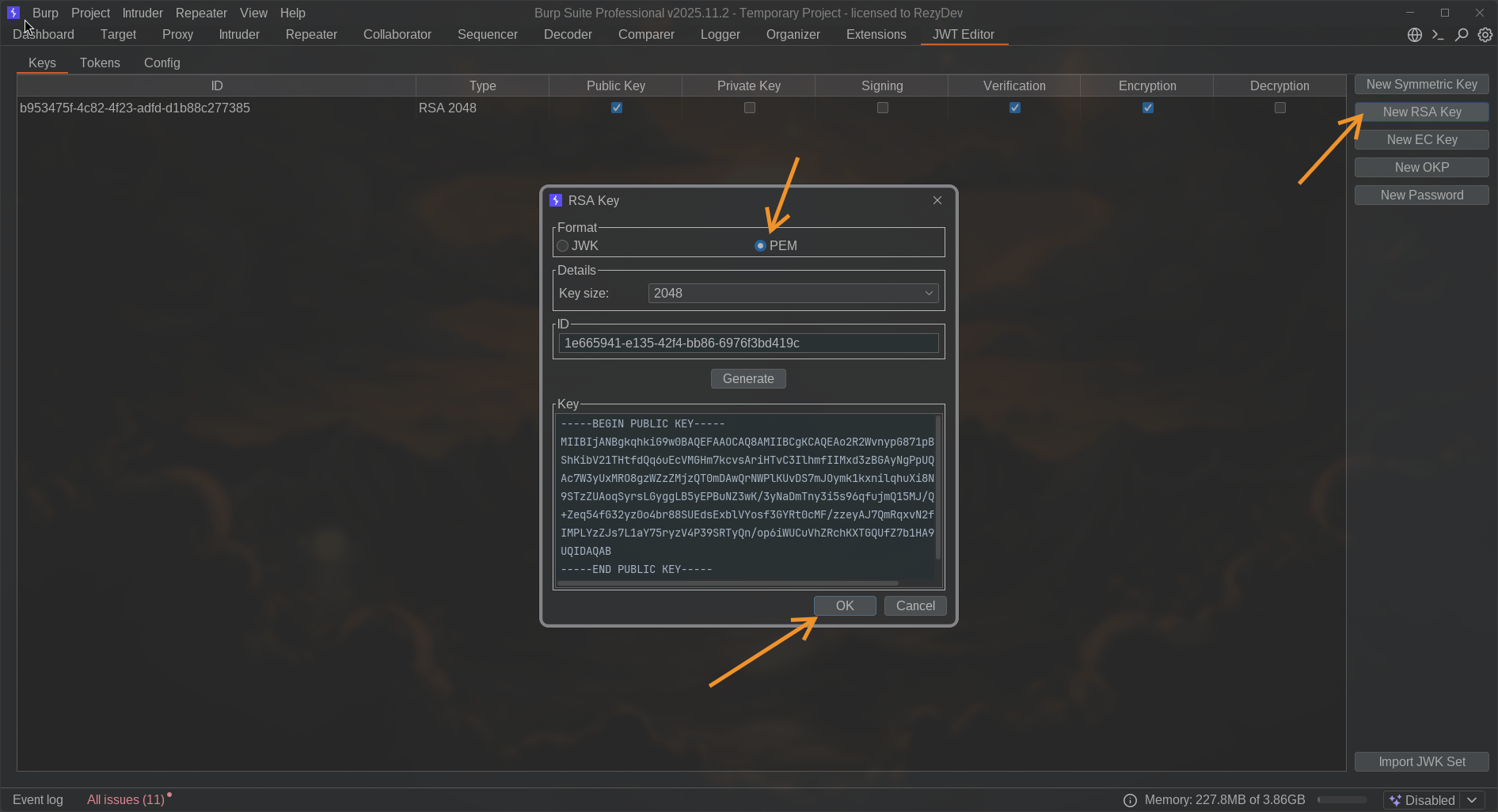
- Once we have the public key in a suitable format, we can modify the JWT however we like. Just make sure that the
algheader is set toHS256. To make it easier, we can use the built in feature for this by modifying the JWT token then useHMAC Key Confusionfeature.
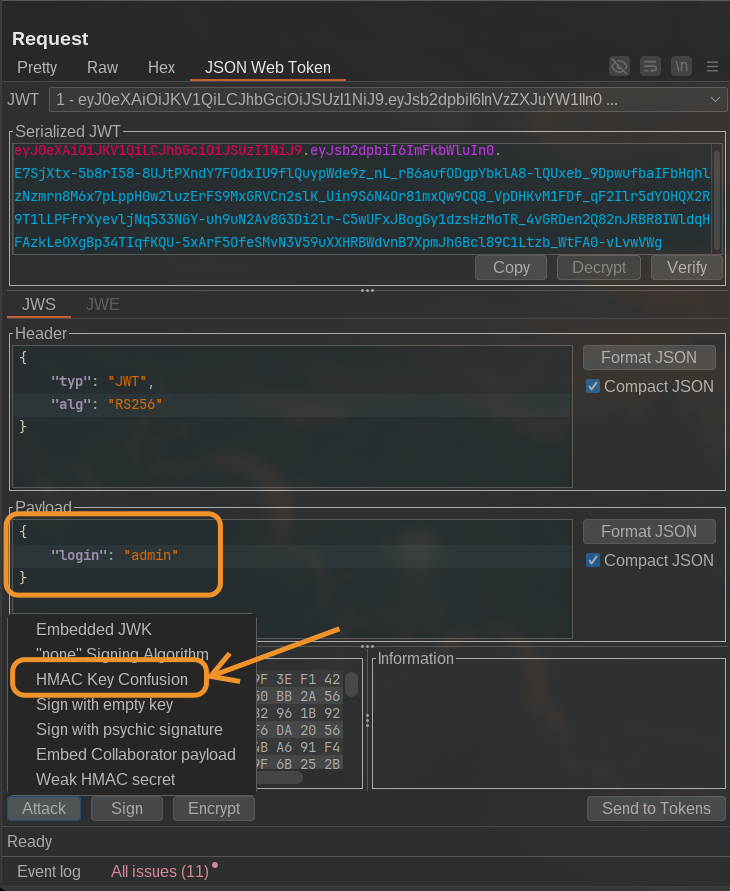
This will Sign the token using the HS256 algorithm with the RSA public key as the secret. Then send the request this will login us as admin user.
Signature Not Verified
Since the signature of the JWT Token is not checked due to flawed code, we can sign the token with empty secret key to attack. Basically We do not even need to change the signature, just modification of payload value such as:
{
    "username": "admin",
    "iat": 1767077044
}
This is enough and no need to re-sign the token.
Weak Secret
If weak HMAC Secret is used to sign the JWT Token, we can bruteforce to find out the secret that was used using hashcat.
/tmp ❯ hashcat -m 16500 eyJ0eXAiOiJKV1QiLCJhbGciOiJIUzI1NiJ9.eyJ1c2VyIjpudWxsfQ.Tr0VvdP6rVBGBGuI_luxGCOaz6BbhC6IxRTlKOW8UjM wordlists.txt --show
eyJ0eXAiOiJKV1QiLCJhbGciOiJIUzI1NiJ9.eyJ1c2VyIjpudWxsfQ.Tr0VvdP6rVBGBGuI_luxGCOaz6BbhC6IxRTlKOW8UjM:pentesterlab
Then we can use JWT Editor to use this HMAC Secret and sign new token with {"user": "admin"} payload.
JWT Token Revocation Bypass
A weak JWT revocation design is when an API “revokes” tokens by caching the entire JWT string (often in something like Redis or Memcached) and denying requests only if the incoming token exactly matches a cached entry.
The problem is that JWTs are transmitted as Base64URL-encoded segments (header.payload.signature), and Base64 encodings can be malleable at the string level (different textual representations can decode to the same bytes in some implementations, or parsers may normalize/pad/accept non-canonical forms). So if the revocation check compares the raw token string (exact match), but the JWT verification library parses/normalizes the token differently (or tolerates alternate encodings), an attacker can submit a semantically identical token (by adding padding == or by flipping a single byte in signature) that still validates cryptographically yet no longer equals the cached “revoked” string bypassing revocation.
Example scenario:
A Node.js + Express API issues JWTs and uses Redis as a “revoked token blacklist”:
- On logout, the server does:
SET revoked:<raw_jwt> = 1with TTL until token expiry. - On each request, middleware does:
if (redis.get("revoked:"+raw_jwt)) deny; else verifyJWT(raw_jwt).
An attacker with a revoked token tries a token-string variation that some parsers accept (e.g., altering non-semantic encoding details such as padding/normalization behavior depending on the stack). The revocation lookup misses because the string key changed, but JWT verification still passes, so access is restored and the attacker can retrieve the protected “key”.
How to prevent it (the correct fix):
- Issue every token with a unique
jti(JWT ID) claim. - Revoke by caching only the
jti(or storing it server-side as invalid), not the whole token string. - On each request: verify JWT → extract
jti→ checkrevoked_jti:<jti>.
That way, even if the token string can be represented in multiple accepted forms, the identifier you revoke is stable, and revocation can’t be bypassed by encoding tricks.
kid Header Injection (Path Traversal)
The issue comes from one of the fields in the header: kid. This parameter is available in some libraries, it's short for key identifier.
The kid is used without proper escaping to retrieve the key. This lack of escaping could lead to multiple types of vulnerabilities, such as:
- SQL injections.
- Directory traversals.
- etc...
To exploit this issue we can:
- Capture the JWT Token using burpsuite.
- Change
kidvalue pointing to/dev/nullusing path traversal, and payload with username asadmin:
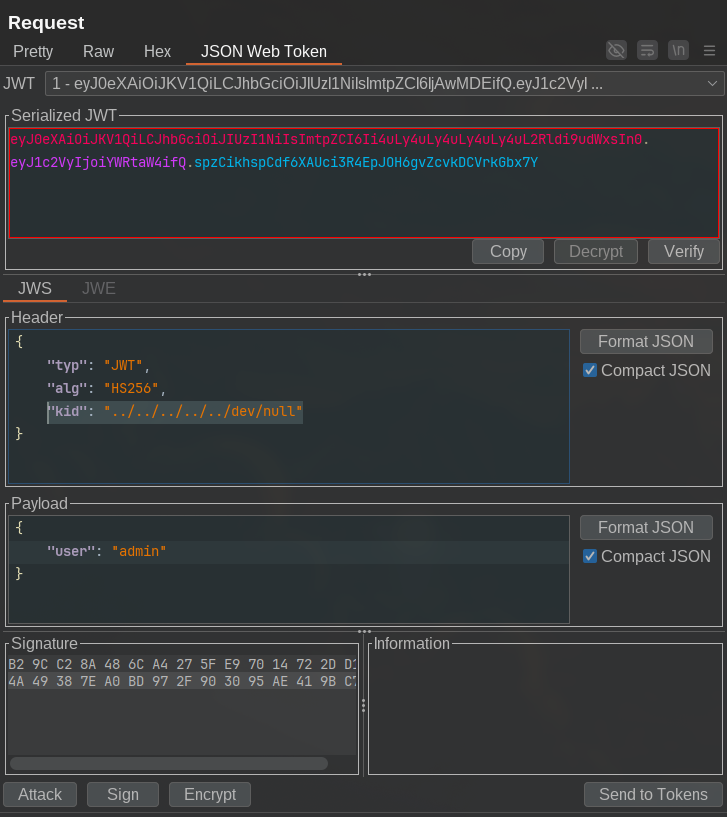
Then sign the JWT using null byte (%00), but using burpsuite we can use Attack > Sign with empty key.
- Send new request to authenticate as user administrator.
We use a null byte to sign the token when pointing to /dev/null, since /dev/null has no content. Alternatively, we can use any .js or .css file from the application. To sign a new token, we use the contents of that file as the signing key during kid injection.
kid Header Injection (SQL Injection)
This attack is similar to one before. But kid is vulnerable to SQL Injection.
To perform this attack, we can:
- Capture the request in burpsuite and use JWT Editor to see it.
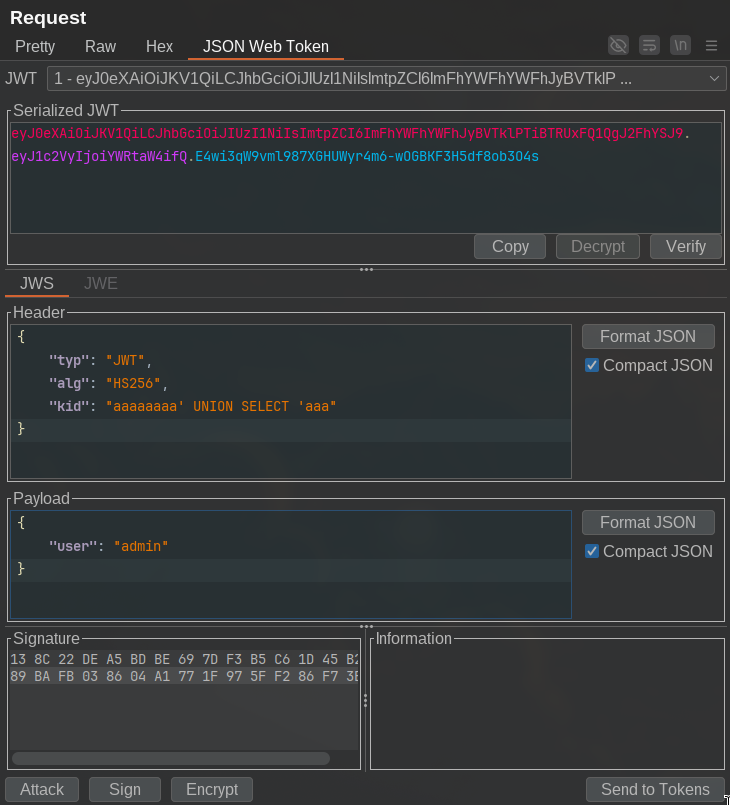
- Change kid header value to
aaaaaa' UNION select 'aaawhich will be interpreted as something like this:
SELECT key FROM keys WHERE kid = '{userinput}' -- User Input as kid value.

SELECT key FROM keys WHERE kid = 'nonExistentValueHere' UNION select 'rezydev' -- Query After SQLi
In the above SQL query, WHERE kid = 'nonExistentValueHere' ensures that no records are returned. The UNION SELECT 'rezydev' then appends the value rezydev to the empty result set.
Since rezydev becomes the returned value, we can use the string "rezydev" as the HMAC secret and sign a new token by changing the username to admin.
kid Header Injection to RCE
This is similar to before example but this is inspired by the vulnerability in the Ruby library Net::FTP (CVE-2017-17405).
The bug impacting the Net::FTP library, as well as this application (scenerio) lies in the difference between a call to:
File.open(....)
### AND
open(...) ## or Kernel.open(...)
While the former allows an attacker with a control over the first argument to read arbitrary files, the latter allows you to run commands (by using a | before the command):
$ irb
irb(main):001:0> File.open("|/usr/bin/uname").read()
Errno::ENOENT: No such file or directory - |/usr/bin/uname
  from (irb):1:in 'initialize'
  from (irb):1:in 'open'
  from (irb):1
  from /usr/bin/irb:12:in '<main>'
irb(main):002:0> open("|/usr/bin/uname").read()
=> "Linux\n"
Since the signature is checked after the vulnerability is exploited, we don't need to provide a valid signature in this exercise.
So we can just send following payload from the JWT Token:
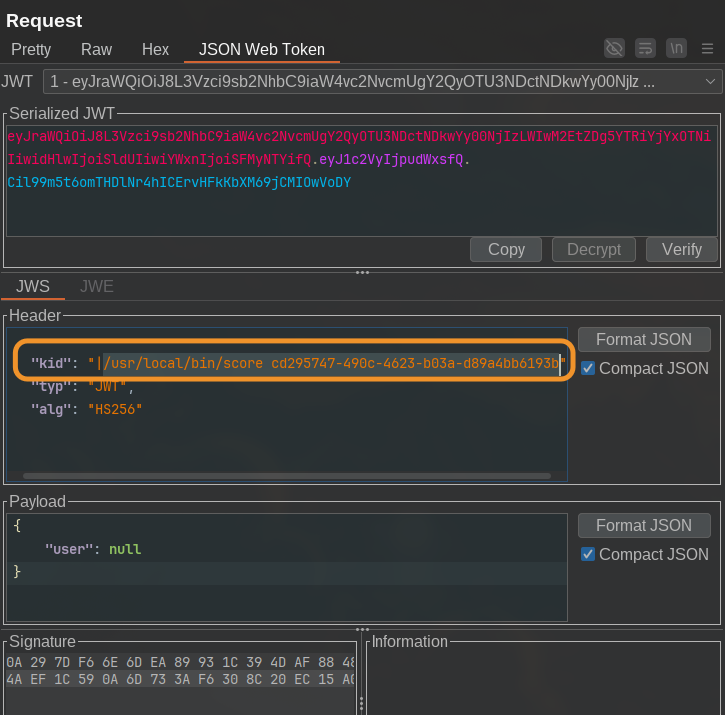
And the command executes even if we get Invalid Signature error.
More....
More JWT Related Attacks are available in sub-categories of this page.