The Penetration Testing Process
The penetration testing process is a structured approach to identifying, exploiting, and mitigating vulnerabilities in systems, applications, and networks. Each phase of the process builds upon the previous one, ensuring a comprehensive assessment of the target environment. Below is a detailed breakdown of each stage, accompanied by real-world examples to illustrate the methodologies involved.
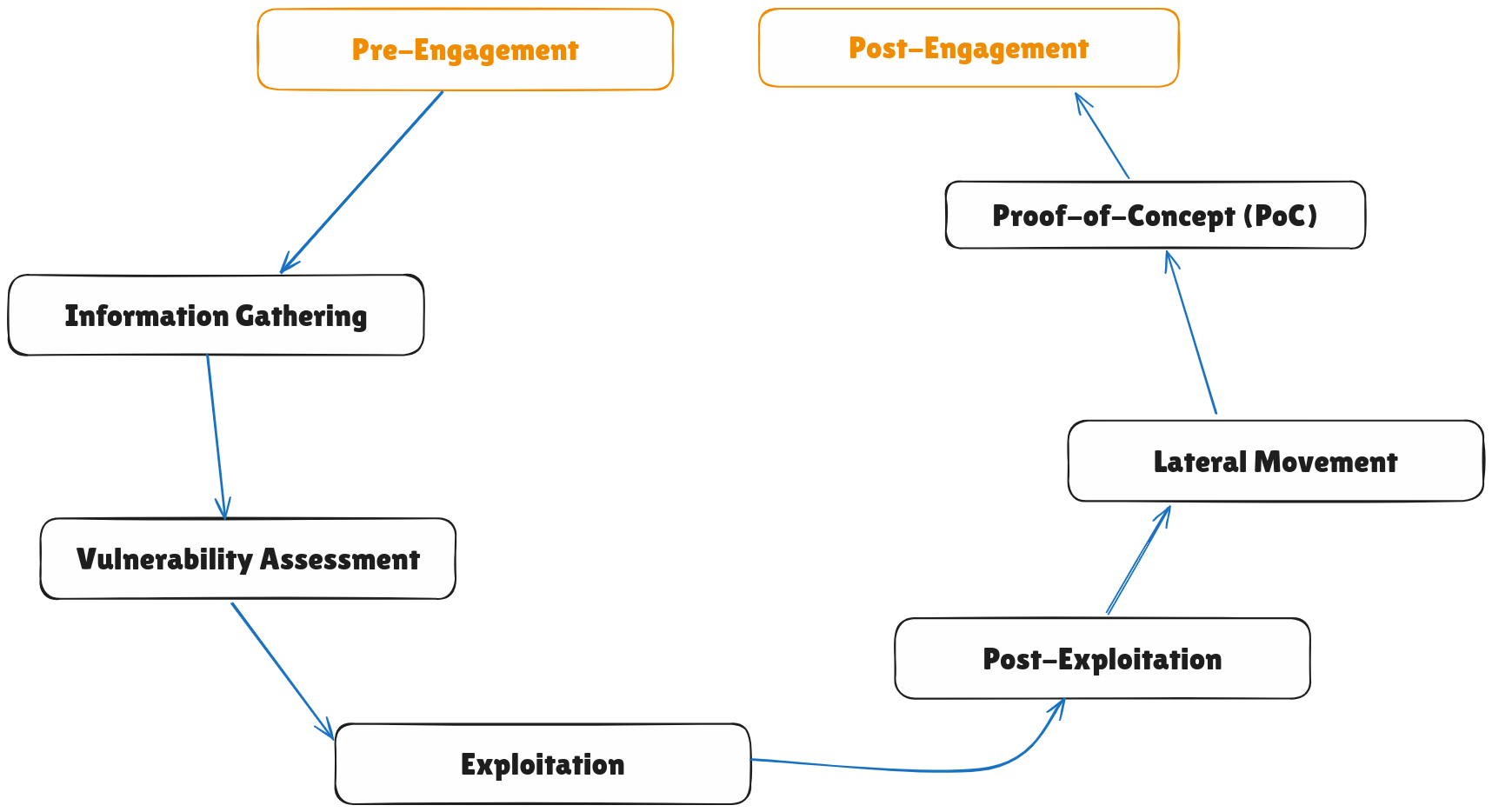
1. Pre-Engagement
Before any testing begins, the pentester and the client establish the rules of engagement. This phase ensures clarity, legality, and alignment of objectives.
Key Activities:
- Defining Scope: Determine which systems, networks, and applications are in-scope.
- Setting Objectives: Clarify goals, such as identifying critical vulnerabilities or testing incident response.
- Authorization: Obtain written consent and ensure compliance with legal requirements.
- Risk Assessment: Identify potential risks and agree on measures to mitigate them.
Example:
- The pentester and client agree to test a public-facing e-commerce website, excluding the production database to avoid disruptions.
2. Information Gathering
The pentester collects as much information as possible about the target to identify potential attack vectors.
Techniques:
- Passive Reconnaissance: Using publicly available information, such as WHOIS records and social media.
- Active Reconnaissance: Probing the target directly, such as using tools like Nmap to scan for open ports.
Example:
- Running
nmap -sS -p 1-1000 target.comreveals that ports 22 (SSH) and 80 (HTTP) are open. This information is critical for identifying potential vulnerabilities.
3. Vulnerability Assessment
This phase involves identifying vulnerabilities within the target environment.
Activities:
- Automated Scanning: Use tools like Nessus or OpenVAS to detect known vulnerabilities.
- Manual Analysis: Validate and analyze results from automated tools to eliminate false positives.
Example:
- A scan reveals that the web server is running an outdated version of Apache vulnerable to directory traversal attacks.
4. Exploitation
Exploitation focuses on leveraging identified vulnerabilities to gain unauthorized access or control over the target system.
Activities:
- Exploiting weak passwords, misconfigurations, or outdated software.
- Using tools like Metasploit to automate exploitation.
Example:
- The pentester uses a SQL injection vulnerability in the login page to bypass authentication and gain admin access.
5. Post-Exploitation
Once access is gained, the pentester evaluates the extent of the compromise and its potential impact.
Activities:
- Privilege Escalation: Gaining higher-level access, such as root or admin privileges.
- Data Exfiltration: Testing the ability to extract sensitive data, such as customer records.
- Persistence: Establishing backdoors to maintain access (if within the scope).
Example:
- After gaining a shell on the target system, the pentester exploits a privilege escalation vulnerability to access sensitive files in the root directory.
6. Lateral Movement
The pentester attempts to move across the network to access additional systems or resources.
Activities:
- Exploiting trust relationships between systems.
- Using stolen credentials or session tokens.
Example:
- Using a compromised domain admin account, the pentester accesses file shares and extracts confidential project documents.
7. Proof-of-Concept (PoC)
Documenting successful exploits to demonstrate vulnerabilities without causing harm.
Activities:
- Capturing screenshots or logs to prove exploitation.
- Creating minimal-impact demonstrations, such as retrieving a harmless file from a sensitive directory.
Example:
- Providing a screenshot of the admin dashboard accessed via SQL injection as evidence.
8. Post-Engagement
This phase focuses on reporting findings and providing recommendations for remediation.
Activities:
- Report Preparation: Include detailed findings, exploited vulnerabilities, and their potential impact.
- Debriefing: Discuss results with the client and recommend mitigation strategies.
- Cleanup: Remove any artifacts, such as scripts or accounts created during testing.
Example:
- The report highlights an insecure admin interface and recommends implementing two-factor authentication and regular software updates.