Kerberos Double-Hop Problem
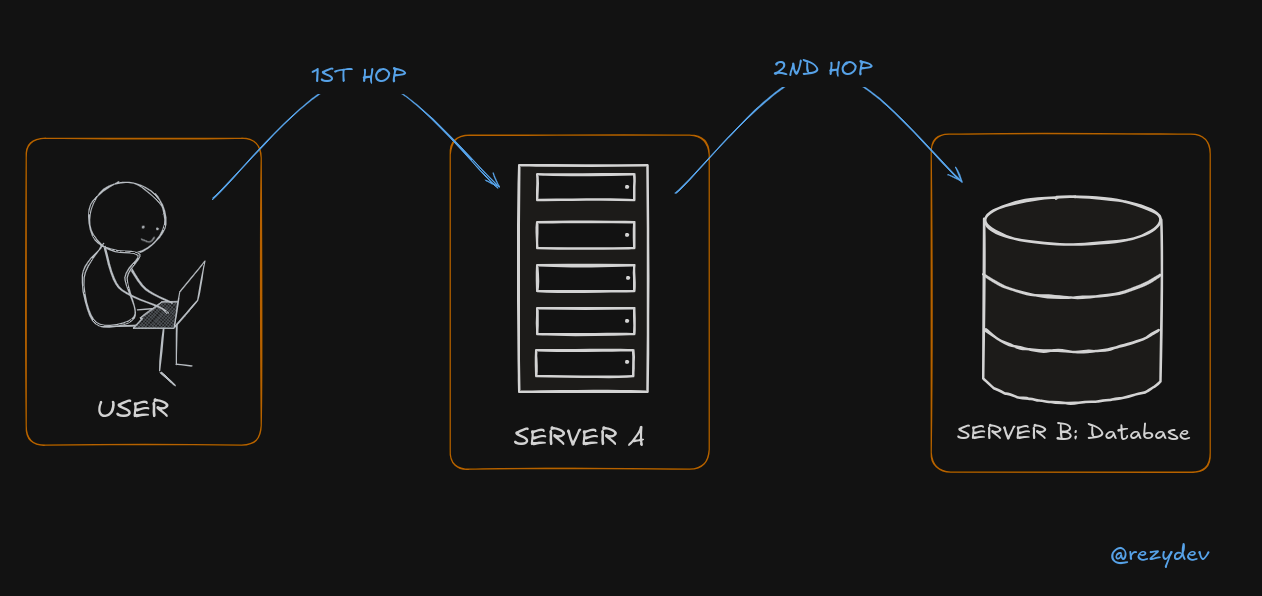
The Kerberos double-hop problem happens when a user logs into a system and tries to access a second system, but authentication fails because Kerberos doesn’t automatically allow credentials to be passed twice (or "hopped" twice).
Example Scenario
Step 1: First Hop (Works)
- You (User) log in to Client Machine and access Server A using Kerberos authentication.
- Kerberos verifies you and issues a ticket to Server A (so Server A knows who you are).
Step 2: Second Hop (Fails)
- From Server A, you try to access Server B (like a database or file server).
- But Server A does not have permission to pass your credentials to Server B, because Kerberos does not allow credential forwarding by default.
- Server B rejects the request, as it does not know who you are.
This failure is called the double-hop problem because the authentication cannot "hop" twice.
Solution: Credential Delegation
To fix this, you need to enable Kerberos delegation, which allows Server A to forward your credentials to Server B securely.
- Unconstrained Delegation: Server A can forward credentials to any server (less secure).
- Constrained Delegation: Server A can only forward credentials to specific servers (more secure).
- Protocol Transition with Constrained Delegation: Allows non-Kerberos authentication (e.g., NTLM) to be converted into Kerberos.
Workarounds
More: https://posts.slayerlabs.com/double-hop/
- PSCredential Object
- Register PSSession Configuration
- Enabling Kerberos Delegation
- Using CredSSP
Evil-WinRM Session
Import-Module .\PowerView.ps1
Get-DomainUser -spn # None of the command works

# Fix
$SecPassword = ConvertTo-SecureString 'Coolpass123@' -AsPlainText -Force
$Cred = New-Object System.Management.Automation.PSCredential('REZYDEV\sqldb', $SecPassword)

# Pass credentials ($Cred Variable) along with the command
Get-DomainUser -spn -credential $Cred | select samaccountname
We're on a domain-joined host and connect remotely.
Or windows-attack-host + we connected to our target via WinRM using the Enter-PSSession.
# Connect using WinRM
Enter-PSSession -ComputerName SERVERA.REZYDEV.LOCAL -Credential rezydev\sqlsrv

Import-Module .\PowerView.ps1
Get-DomainUser -spn # None of the command works

# Fix
Register-PSSessionConfiguration -Name coolconfig -RunAsCredential rezydev\sqlsrv
Restart-Service WinRM # restart the WinRM service

# Verify Fix
Enter-PSSession -ComputerName SERVERA -Credential REZYDEV\sqlsrv -ConfigurationName coolconfig
We can't use Register-PSSessionConfiguration from Evil-WinRM Shell because we won't be able to get the credentials popup.
Step 1: Ensure Kerberos Authentication is Used
-
Ensure all machines are in the same Active Directory (AD) domain.
-
Check that users authenticate with Kerberos (not NTLM).
-
You can verify this using:
klistIf Kerberos is working, you should see tickets listed.
Step 2: Configure Delegation in Active Directory
- Open Active Directory Users and Computers (ADUC) (
dsa.msc). - Find the Server A account (if it's a service account, locate that instead).
- Right-click → Properties → Go to Delegation tab.
- Choose "Trust this computer for delegation to specified services only".
- Click "Add" → Select Server B and specify the service (e.g.,
MSSQLSvcfor SQL Server). - Apply and restart services.
Step 1: Testing Kerberos Authentication
Run this from Client to see if Server A accepts Kerberos:
Test-ComputerSecureChannel -Server "ServerA" -Credential (Get-Credential)
Then check Kerberos ticket cache:
klist
You should see a ticket for ServerA.
Step 2: Checking Double-Hop Issue
Run this command from Server A to access Server B:
Invoke-Command -ComputerName ServerB -Credential (Get-Credential) {whoami}
If it fails, you likely have the double-hop problem.
Step 3: Fixing with CredSSP (Alternative to Delegation)
If configuring delegation in AD is not possible, you can temporarily enable CredSSP:
Enable CredSSP on Client:
powershellCopyEditEnable-WSManCredSSP -Role Client -DelegateComputer ServerA
Enable CredSSP on Server A:
Enable-WSManCredSSP -Role Server
Now run:
Invoke-Command -ComputerName ServerB -Credential (Get-Credential) -Authentication CredSSP {whoami}
This works, but CredSSP is less secure than Kerberos delegation, so only use it as a temporary workaround.